🚀 Getting Started#
Installing VSenseBox is very easy and straightforward. You can install from PyPI directly or use the prebuilt .whl files on GitHub releases or install from GitHub directly or build it from source on your own machine. However, in order to get it work, you need to install all the necessary dependencies or requirements for the modules you need.
⚙️ Requirements#
All requirements are not strictly limited. However, some specific modules might need some special dependencies; for example, YOLO_Classic (With .weights model) runs faster using OpenCV DNN with GPU. In this case, you might need to build OpenCV from source with GPU support or use our pyppbox-opencv instead of the official opencv-contrib-python.
Prerequisite:
Python [3.9-3.12] (For macOS -> Use Python 3.11 for bug-free GUI)
Local
VSenseBoxrepo:git clone https://github.com/numediart/vsensebox.git
Before you install dependencies/requirements:
For Linux, recommend changing
python3topython:sudo apt install python-is-python3If you prefer conda + Python [3.9-3.12]:
conda create --name vsensebox_env python=3.11Upgrade
pipandsetuptools:python -m pip install --upgrade pip pip install "setuptools>=67.8.0"
Recommend uninstalling the official
Ultralytics:pip uninstall -y ultralytics
Install dependencies/requirements under
vsensebox/requirements/:Before you install all dependencies from requirements.txt, please make sure you first install PyTorch (CPU or GPU) as appropriate for your system.
# First, install PyTorch (CPU or GPU): https://pytorch.org/get-started/locally/
pip install -r requirements.txt
💽 Setup#
vsensebox is the main package and if you use the classic YOLO detectors and DeepSORT tracker, etc., you need to also install vsensebox-data-xxx.
Install
vsenseboxDownload and install the latest wheel in GitHub releases or install from PyPI:
pip install vsensebox
Or install directly from GitHub:
pip install git+https://github.com/numediart/vsensebox.git
Or build from source:
pip install setuptools wheel build PyYAML
python -m build --wheel --skip-dependency-check --no-isolation
Install
vsensebox-data-xxxDownload the latest from GitHub releases and install
Or install the ones you need directly from the links below:
pip install https://github.com/numediart/vsensebox-data/releases/download/v0.0.0/vsensebox_data_yolocls-0.0.0-py3-none-any.whl
pip install https://github.com/numediart/vsensebox-data/releases/download/v0.0.3/vsensebox_data_yoloult-0.0.3-py3-none-any.whl
pip install https://github.com/numediart/vsensebox-data/releases/download/v0.0.0/vsensebox_data_deepsort-0.0.0-py3-none-any.whl
Let’s try some basic features of
VSenseBoxConfigurator GUI can be called in Python terminal:
import vsensebox
vsensebox.config()
Now you should see the Configurator GUI like in this scheenshot:
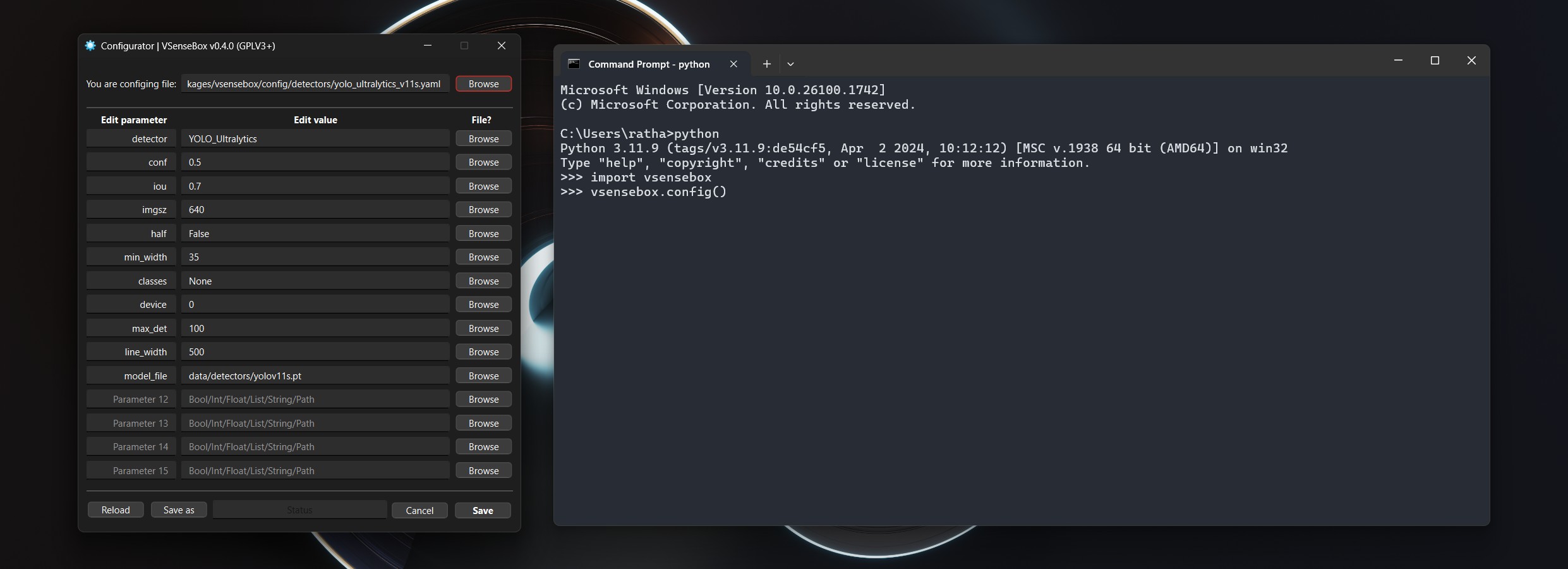
You can also easily reset the internal configurations by calling the
reset().vsensebox.reset()
For the details of GUI functions and configurations, check Configurations page.
Check the Examples page for some real coding!
⚠️
VSenseBoxis set to use GPU by default, and to switch to CPU, you must setcpuas string for the parameterdevicein the YAML config file; for example, line #8 inyolo_ultralytics_v8s.yaml.
If you have GUI related issue:
For macOS, you may try Python 3.11 as suggested in Prerequisite section above.
For Linux, you might need to install these:
sudo apt-get install '^libxcb.*-dev' libx11-xcb-dev libglu1-mesa-dev libxrender-dev libxi-dev libxkbcommon-dev libxkbcommon-x11-dev
For Ubuntu on WSL 2, you need to install these:
sudo apt-get install libgl1-mesa-glx xdg-utils libegl1
📢 FYI#
1️⃣ Customized OpenCV#
OpenCV is widely used in many well-known packages, but the majority of the prebuilt WHLs on the Internet including the official one on PyPI do not include GPU support. Thus, we build our custom one which includes NVIDIA CUDA & cuDNN supports for the OpenCV DNN module. In order to well distinguish from the rest, we decided to build and change the package name from opencv-contrib-python to pyppbox-opencv -> [Repo] [WHL]
2️⃣ Customized Ultralytics#
Also, similar to pyppbox-opencv, our custom ultralytics is changed to vsensebox-ultralytics, but this time, the module name is still the same ultralytics and it is the main reason why the official ultralytics must be removed. Find out more why VSenseBox needs the customized vsensebox-ultralytics -> [Repo] [PyPI]